
Redux from First Principles: Architecture, Evolution, and a React TypeScript Bug Tracker
Trace Redux from Flux to Redux Toolkit, then understand actions, reducers, hooks, Observer, Mediator, Publish/Subscribe, and state transitions through one working application.
Redux can look more complicated than it really is. Terms such as slice, reducer, dispatch, selector, Provider, and hook arrive all at once, and the relationship between them is not always obvious.
The easiest way to understand Redux is to answer two questions in order:
What architectural problem was Redux designed to solve?
What exactly happens after a user clicks a button?
We will answer the first by tracing Redux’s evolution from Flux and relating it carefully to Observer, Mediator, Publish/Subscribe, Command, and state-transition concepts. We will answer the second by following one event through a very small application.
In this article, we will build a bug tracker with exactly three actions:
bugAddedbugResolvedbugRemoved
The user can report a bug, resolve it, and remove it. The application is deliberately small, but it contains the complete Redux architecture used by much larger applications.
By the end, you will understand not only how the code works, but also why each piece exists and which design-pattern comparisons are accurate—and which require qualification.
Here is the journey:
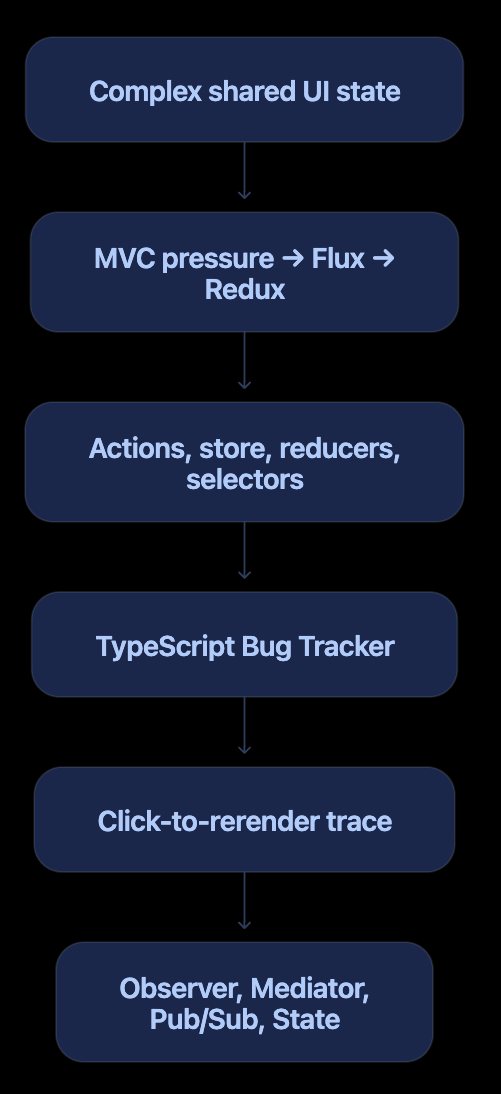
The Redux Mental Model
Redux is a predictable container for shared application state.
Its core rule is:
Components do not directly modify shared state. They dispatch actions describing what happened. Reducers calculate the next state, and subscribed components render the result.
The shortest useful formula is:
Event → Dispatch → Reduce → Store → Notify → Select → Render
Or mathematically:
nextState = reducer(currentState, action)
The overall architecture is unidirectional:

There is no direct path from the component to the state:
// Do not mutate Redux data in a component.
bugs.push(newBug);
Instead, the component reports an event:
dispatch(bugAdded(description));
Redux Terminology in Plain English
| Term | Meaning |
|---|---|
| State | The application data currently held by Redux |
| Store | The object that owns the Redux state |
| Action | A plain object describing what happened |
| Action creator | A function that creates an action |
| Dispatch | The store function that sends an action through Redux |
| Reducer | A function that determines the next state |
| Case reducer | The handler for one particular action inside a slice |
| Slice | State, actions, and reducer logic for one feature |
| Selector | A function that reads or derives something from state |
| Provider | Makes the Redux store available to the React tree |
| Hook | Connects a function component to a React or library capability |
How Redux Evolved
Redux makes more sense when we see it as an answer to the growing complexity of interactive user interfaces rather than as an arbitrary collection of APIs.
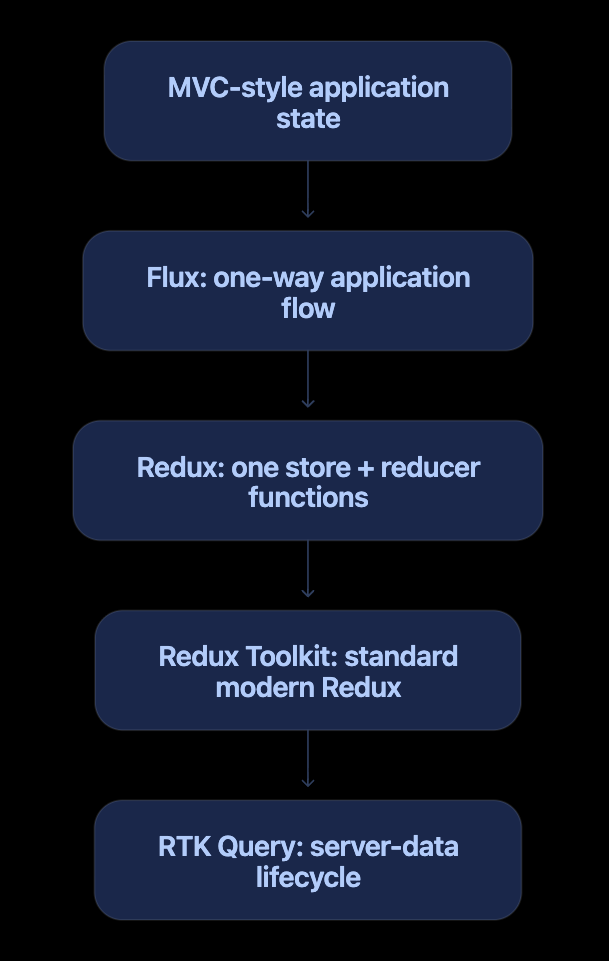
Stage 1: Increasing pressure on MVC-style applications
MVC itself is not the problem. The difficulty appears when a large client application permits shared state to change through many paths:
View A updates a model
→ Model change affects View B
→ Server response changes the model again
→ View C triggers another dependent update
As the number of interactions grows, answering “What changed this value?” becomes harder. A predictable direction of travel becomes valuable.
Stage 2: Flux and unidirectional flow
Flux introduced a disciplined application flow:
Action → Dispatcher → Stores → Views
   ↑                            │
   └────── user interaction ────┘
Traditional Flux commonly had:
Actions describing events
A central dispatcher
Multiple stores containing state and update logic
Views that read stores and initiate new actions

The central dispatcher also had a mediator-like quality: views and stores did not need to coordinate through direct references.
Stage 3: Redux simplifies and tightens Flux
Redux preserved unidirectional flow but changed the mechanics:
| Traditional Flux | Redux |
|---|---|
| Usually multiple independent stores | Usually one store and one state tree |
| Separate dispatcher | store.dispatch() |
| Stores contain state and update behavior | Store owns state; reducers define transitions |
| Store-specific change emitters | Store-level subscription mechanism |
| Implementations may vary | Small, explicit core contract |
Redux’s conceptual flow is:
Action → store.dispatch() → Root reducer → Next state → Subscribers
The state transition became an explicit function:
const nextState = reducer(currentState, action);
This helped make updates traceable, replayable, testable, and friendly to developer tooling.
Stage 4: Redux Toolkit becomes the standard approach
Early Redux code required substantial manual ceremony: action-type constants, action creators, switch statements, immutable object copies, and store setup. Redux Toolkit standardized common practices and reduced that code with configureStore(), createSlice(), strong TypeScript inference, and Immer.
Stage 5: RTK Query addresses server data
Client state and server data have different concerns. Server data involves caching, freshness, request deduplication, loading states, invalidation, and refetching. RTK Query added a purpose-built layer for those concerns while remaining part of the Redux Toolkit ecosystem.
Our Bug Tracker will focus first on client state. That gives us the clearest possible view of Redux’s core mechanics.
Why Redux Toolkit?
Modern Redux applications should normally use Redux Toolkit. It provides:
configureStore()for store configurationcreateSlice()for state, action creators, and reducer logicImmer-powered immutable updates
Good TypeScript inference
Sensible defaults for development checks and middleware
Older Redux code often manually defines string constants, action creators, switch statements, and immutable copies. Redux Toolkit keeps the same Redux principles while removing much of that ceremony.
Create the Project
Create a Vite React TypeScript application:
npm create vite@latest redux-bug-tracker -- --template react-ts
cd redux-bug-tracker
npm install
npm install @reduxjs/toolkit react-redux
npm run dev
Our source structure is feature-oriented:
src/
├── app/
│   ├── store.ts
│   └── hooks.ts
├── features/
│   └── bugs/
│       ├── bugsSlice.ts
│       ├── bugSelectors.ts
│       ├── BugForm.tsx
│       └── BugList.tsx
├── App.tsx
├── main.tsx
└── styles.css
The app directory contains application-wide Redux plumbing. The features/bugs directory owns everything specific to the bugs feature.
Step 1: Model the State with TypeScript
Create src/features/bugs/bugsSlice.ts and begin with the domain model:
export interface Bug {
  id: string;
  description: string;
  resolved: boolean;
}

interface BugsState {
  items: Bug[];
}

const initialState: BugsState = {
  items: [],
};
A bug is plain serializable data:
{
  id: "bug-101",
  description: "Checkout button does nothing",
  resolved: false
}
The feature begins with an empty list. Once registered in the store, the root state will look like this:
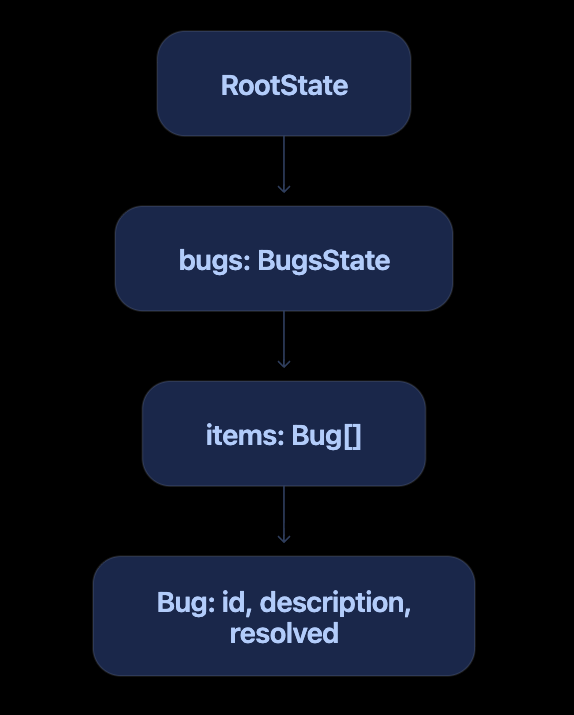
Step 2: Create the Slice and Its Three Actions
Here is the complete slice:
import {
  createSlice,
  nanoid,
  type PayloadAction,
} from "@reduxjs/toolkit";

export interface Bug {
  id: string;
  description: string;
  resolved: boolean;
}

interface BugsState {
  items: Bug[];
}

const initialState: BugsState = {
  items: [],
};

const bugsSlice = createSlice({
  name: "bugs",
  initialState,

  reducers: {
    bugAdded: {
      reducer: (
        state,
        action: PayloadAction<Bug>,
      ) => {
        state.items.push(action.payload);
      },

      prepare: (description: string) => ({
        payload: {
          id: nanoid(),
          description,
          resolved: false,
        },
      }),
    },

    bugRemoved: (
      state,
      action: PayloadAction<string>,
    ) => {
      state.items = state.items.filter(
        bug => bug.id !== action.payload,
      );
    },

    bugResolved: (
      state,
      action: PayloadAction<string>,
    ) => {
      const bug = state.items.find(
        bug => bug.id === action.payload,
      );

      if (bug) {
        bug.resolved = true;
      }
    },
  },
});

export const {
  bugAdded,
  bugRemoved,
  bugResolved,
} = bugsSlice.actions;

export default bugsSlice.reducer;
createSlice() generates several related things:
bugsSlice
├── actions
│   ├── bugAdded
│   ├── bugRemoved
│   └── bugResolved
├── caseReducers
│   ├── bugAdded
│   ├── bugRemoved
│   └── bugResolved
└── reducer
    └── complete bugs slice reducer
The name participates in the generated action types:
| Action creator | Generated action type |
|---|---|
bugAdded(...) |
bugs/bugAdded |
bugRemoved(...) |
bugs/bugRemoved |
bugResolved(...) |
bugs/bugResolved |
The difference between an action creator and an action
This is an action creator call:
bugResolved("bug-101");
It returns an action object resembling:
{
  type: "bugs/bugResolved",
  payload: "bug-101"
}
Creating that object does not update the state. Redux processes it only when it is dispatched:
dispatch(bugResolved("bug-101"));
Why bugAdded uses prepare
The UI should need to provide only the description:
dispatch(bugAdded("Checkout button does nothing"));
The slice owns the rules for constructing a new bug:
prepare: (description: string) => ({
  payload: {
    id: nanoid(),
    description,
    resolved: false,
  },
}),
This keeps ID creation and the initial status out of the UI. The case reducer receives a fully constructed, correctly typed Bug.
Why apparent mutation is safe here
These lines look mutable:
state.items.push(action.payload);
bug.resolved = true;
Redux Toolkit uses Immer. Inside a Toolkit reducer, Immer tracks the changes and produces a new immutable state. Conceptually, resolving a bug is equivalent to:
return {
  ...state,
  items: state.items.map(bug =>
    bug.id === action.payload
      ? { ...bug, resolved: true }
      : bug,
  ),
};
The concise mutation-style syntax is allowed inside the reducer. Components must still never mutate selected state.
Step 3: Configure the Store
Create src/app/store.ts:
import { configureStore } from "@reduxjs/toolkit";
import bugsReducer from "../features/bugs/bugsSlice";

export const store = configureStore({
  reducer: {
    bugs: bugsReducer,
  },
});

export type RootState =
  ReturnType<typeof store.getState>;

export type AppDispatch =
  typeof store.dispatch;
Read this configuration as:
Create a Redux store with a
bugsstate section, managed bybugsReducer.
The two sides of this line have different jobs:
bugs: bugsReducer
| Expression | Meaning |
|---|---|
Left-side bugs |
Property name in the root state |
Right-side bugsReducer |
Function that manages that property |
That is why a selector later reads:
state.bugs.items
Where was bugsReducer defined?
The slice file ends with:
export default bugsSlice.reducer;
The store imports that default export and chooses a local name:
import bugsReducer from "../features/bugs/bugsSlice";
A default import can choose its local name. These would all import the same value:
import bugsReducer from "../features/bugs/bugsSlice";
import reducer from "../features/bugs/bugsSlice";
import bugStateUpdater from "../features/bugs/bugsSlice";
bugsReducer is simply the clearest name.
The root reducer
configureStore() combines registered slice reducers into a root reducer. Conceptually, it creates something like:
function rootReducer(currentState, action) {
  return {
    bugs: bugsReducer(
      currentState?.bugs,
      action,
    ),
  };
}
During initialization, Redux supplies undefined as the previous slice state. The reducer responds with initialState, producing:
{
  bugs: {
    items: []
  }
}
The types are derived from the actual store rather than manually duplicated:
export type RootState =
  ReturnType<typeof store.getState>;

export type AppDispatch =
  typeof store.dispatch;
If another reducer is added later, RootState updates automatically.
Step 4: Create Typed Hooks
Create src/app/hooks.ts:
import {
  useDispatch,
  useSelector,
} from "react-redux";

import type {
  AppDispatch,
  RootState,
} from "./store";

export const useAppDispatch =
  useDispatch.withTypes<AppDispatch>();

export const useAppSelector =
  useSelector.withTypes<RootState>();
A hook is a function that connects a React function component to a React or library-managed capability.
In this application:
useState()        → local component state
useAppDispatch()  → Redux store dispatch
useAppSelector()  → Redux state selection and subscription
The custom hooks add our application-specific TypeScript types to React Redux’s hooks. As a result, TypeScript understands the store shape and accepted actions throughout the UI.
Step 5: Provide the Store to React
In src/main.tsx:
import { StrictMode } from "react";
import { createRoot } from "react-dom/client";
import { Provider } from "react-redux";
import App from "./App";
import { store } from "./app/store";
import "./styles.css";

createRoot(
  document.getElementById("root")!,
).render(
  <StrictMode>
    <Provider store={store}>
      <App />
    </Provider>
  </StrictMode>,
);
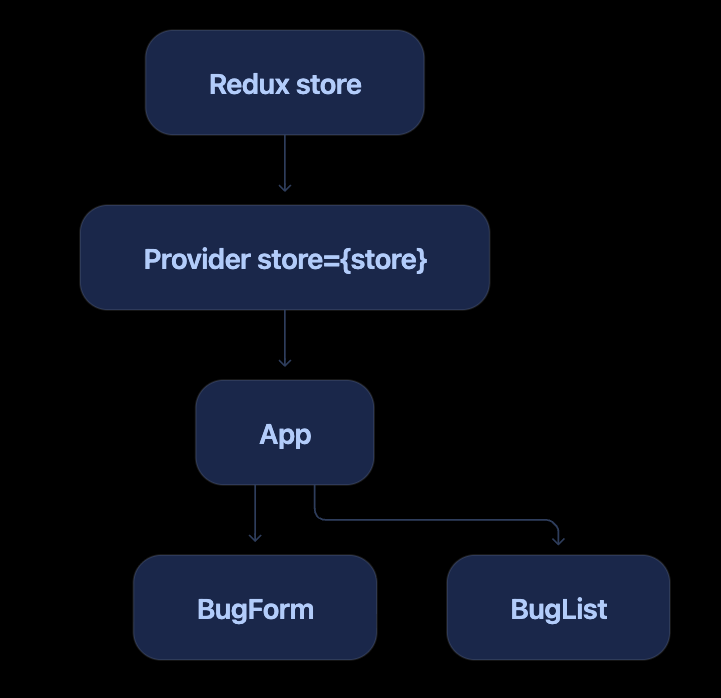
The Provider places the store into React Context so descendants can access it:
This is DI-like context-based dependency provision:
The store is created outside the components.
The
Providersupplies it to the component tree.Hooks consume capabilities from it.
Components do not construct or directly import the store instance.
It is not traditional constructor injection, but it applies the same central principle: dependencies are supplied from outside the consumer.
Step 6: Dispatch bugAdded from the Form
Create src/features/bugs/BugForm.tsx:
import {
  useState,
  type FormEvent,
} from "react";

import { useAppDispatch } from "../../app/hooks";
import { bugAdded } from "./bugsSlice";

export default function BugForm() {
  const [description, setDescription] =
    useState("");

  const dispatch = useAppDispatch();

  const reportBugHandler = (
    event: FormEvent<HTMLFormElement>,
  ) => {
    event.preventDefault();

    const trimmedDescription =
      description.trim();

    if (!trimmedDescription) return;

    dispatch(bugAdded(trimmedDescription));
    setDescription("");
  };

  return (
    <form onSubmit={reportBugHandler}>
      <label htmlFor="description">
        Bug description
      </label>

      <input
        id="description"
        value={description}
        onChange={event =>
          setDescription(event.target.value)
        }
        placeholder="Checkout button does nothing"
      />

      <button type="submit">
        Report bug
      </button>
    </form>
  );
}
The text currently being typed belongs only to BugForm, so local state is appropriate:
const [description, setDescription] = useState("");
The submitted bug is shared application state, so it enters Redux:
dispatch(bugAdded(trimmedDescription));
This line contains two calls. Expanded, it is:
const action = bugAdded(trimmedDescription);
dispatch(action);
First, bugAdded() creates the action. Then dispatch() sends that action to the store.
The dispatch variable is obtained here:
const dispatch = useAppDispatch();
It is, in practical terms, the store’s dispatch function accessed through React Redux:
// Conceptual equivalent
const dispatch = store.dispatch;
Using the hook is preferable inside a component because it obtains the store supplied by Provider, keeps the component less tightly coupled, and remains easy to test.
Step 7: Create Selectors
Create src/features/bugs/bugSelectors.ts:
import type { RootState } from "../../app/store";

export const selectAllBugs = (
  state: RootState,
) => state.bugs.items;

export const selectOpenBugCount = (
  state: RootState,
) =>
  state.bugs.items.filter(
    bug => !bug.resolved,
  ).length;
A selector is a query over Redux state:
RootState → selected or derived value
selectAllBugs returns stored state. selectOpenBugCount derives a number from stored state.
We intentionally do not store the open count separately:
// Avoid unnecessary duplicated state.
interface BugsState {
  items: Bug[];
  openBugCount: number;
}
If the count can always be calculated from items, deriving it avoids synchronization bugs.
Step 8: Subscribe, Render, Resolve, and Remove
Create src/features/bugs/BugList.tsx:
import {
  useAppDispatch,
  useAppSelector,
} from "../../app/hooks";

import {
  selectAllBugs,
  selectOpenBugCount,
} from "./bugSelectors";

import {
  bugRemoved,
  bugResolved,
} from "./bugsSlice";

export default function BugList() {
  const bugs =
    useAppSelector(selectAllBugs);

  const openBugCount =
    useAppSelector(selectOpenBugCount);

  const dispatch = useAppDispatch();

  return (
    <section>
      <h2>Reported bugs</h2>
      <span>{openBugCount} open</span>

      {bugs.length === 0 ? (
        <p>No bugs reported yet.</p>
      ) : (
        <ul>
          {bugs.map(bug => (
            <li key={bug.id}>
              <strong>{bug.description}</strong>

              <small>
                {bug.resolved
                  ? "Resolved"
                  : "Open"}
              </small>

              {!bug.resolved && (
                <button
                  onClick={() =>
                    dispatch(
                      bugResolved(bug.id),
                    )
                  }
                >
                  Resolve
                </button>
              )}

              <button
                onClick={() =>
                  dispatch(
                    bugRemoved(bug.id),
                  )
                }
              >
                Remove
              </button>
            </li>
          ))}
        </ul>
      )}
    </section>
  );
}
This line is where BugList reads and effectively subscribes to the selected bug array:
const bugs = useAppSelector(selectAllBugs);
It means:
Run
selectAllBugsagainst the current store, return its result, and rerender this component when that selected result changes.
The component does not subscribe to bugAdded, bugResolved, or any reducer. It subscribes to the selected state value.
Conceptually, React Redux performs behavior similar to:
let previousSelection =
  selectAllBugs(store.getState());

store.subscribe(() => {
  const nextSelection =
    selectAllBugs(store.getState());

  if (nextSelection !== previousSelection) {
    previousSelection = nextSelection;
    rerenderBugList();
  }
});
The actual implementation is more sophisticated and manages React’s lifecycle correctly, but this is the essential idea.
Step 9: Assemble the UI
In src/App.tsx:
import BugForm from "./features/bugs/BugForm";
import BugList from "./features/bugs/BugList";

export default function App() {
  return (
    <main>
      <header>
        <p>React + TypeScript + Redux Toolkit</p>
        <h1>Bug Tracker</h1>
      </header>

      <BugForm />
      <BugList />
    </main>
  );
}
App does not pass bugs or event handlers through props. BugForm dispatches actions, while BugList selects the state it needs.
Trace One Click End to End
Assume the user clicks Resolve for bug-101.
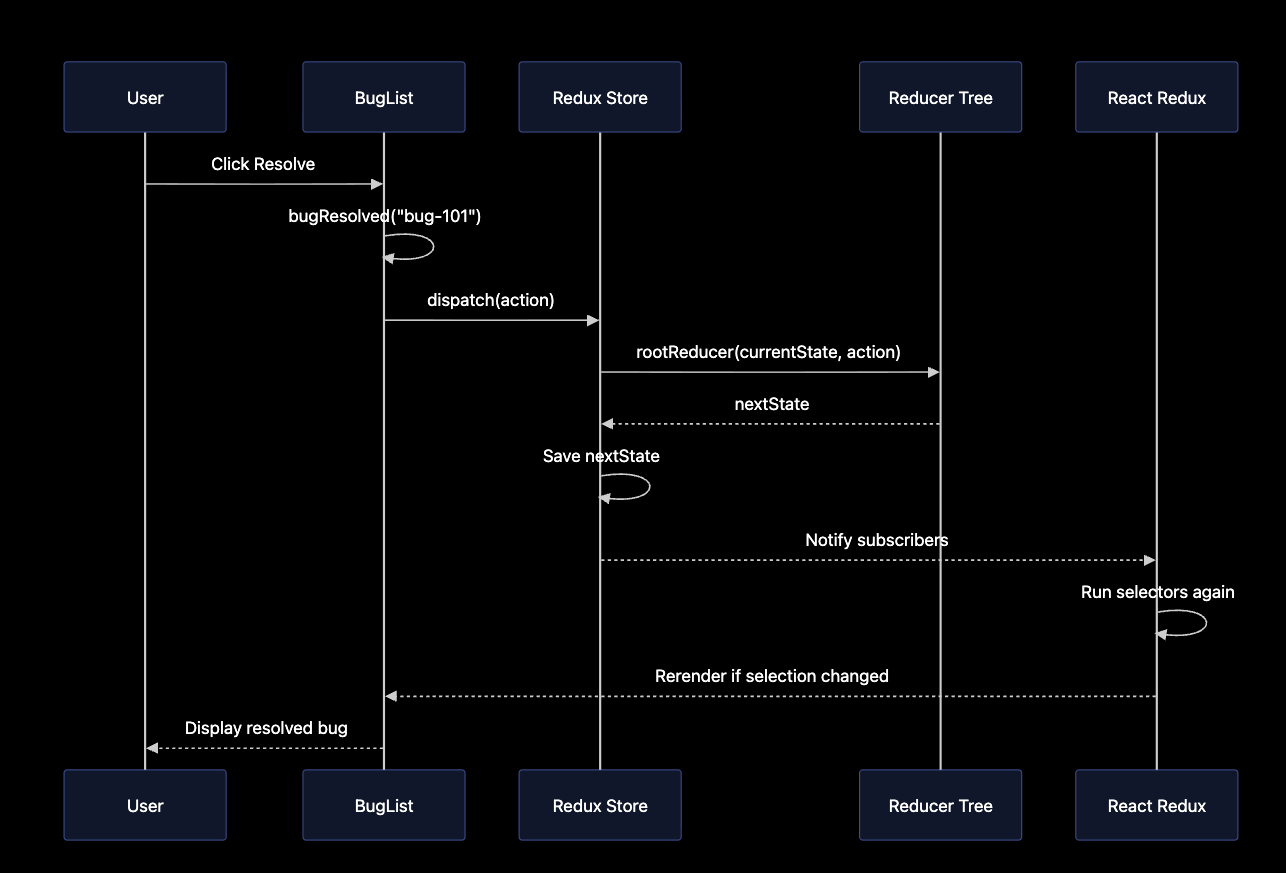
1. The click handler runs
onClick={() =>
  dispatch(bugResolved(bug.id))
}
2. The action creator creates an action
bugResolved("bug-101");
produces:
{
  type: "bugs/bugResolved",
  payload: "bug-101"
}
3. The store dispatches the action
dispatch(action);
4. Redux calls the reducer tree
Conceptually:
const nextState = rootReducer(
  currentState,
  action,
);
5. The matching case reducer runs
const bug = state.items.find(
  bug => bug.id === action.payload,
);

if (bug) {
  bug.resolved = true;
}
6. The reducer returns the next state
Before:
{
  id: "bug-101",
  description: "Checkout button does nothing",
  resolved: false
}
After:
{
  id: "bug-101",
  description: "Checkout button does nothing",
  resolved: true
}
7. The store saves the next state
The store replaces its current state reference with the state returned by the reducer tree.
8. The store notifies subscribers
React Redux is listening for store updates and is notified after the dispatch completes.
9. React Redux runs selectors again
selectAllBugs(store.getState());
selectOpenBugCount(store.getState());
10. React Redux compares the results
The bug array has a new reference and the open count has changed. React Redux schedules BugList to rerender.
11. The user sees the new UI
The status changes to Resolved, the Resolve button disappears, and the open-bug count decreases.
Is There One Reducer per Action?
The answer depends on what we mean by reducer.
Inside our slice, there is normally one case reducer for each action defined in reducers:
| Action type | Case reducer |
|---|---|
bugs/bugAdded |
bugAdded handler |
bugs/bugResolved |
bugResolved handler |
bugs/bugRemoved |
bugRemoved handler |
Redux Toolkit combines those handlers into one slice reducer:
bugsReducer
├── handles bugs/bugAdded
├── handles bugs/bugResolved
└── handles bugs/bugRemoved
At the store level, an action is sent through the entire reducer tree, not routed exclusively to one function:
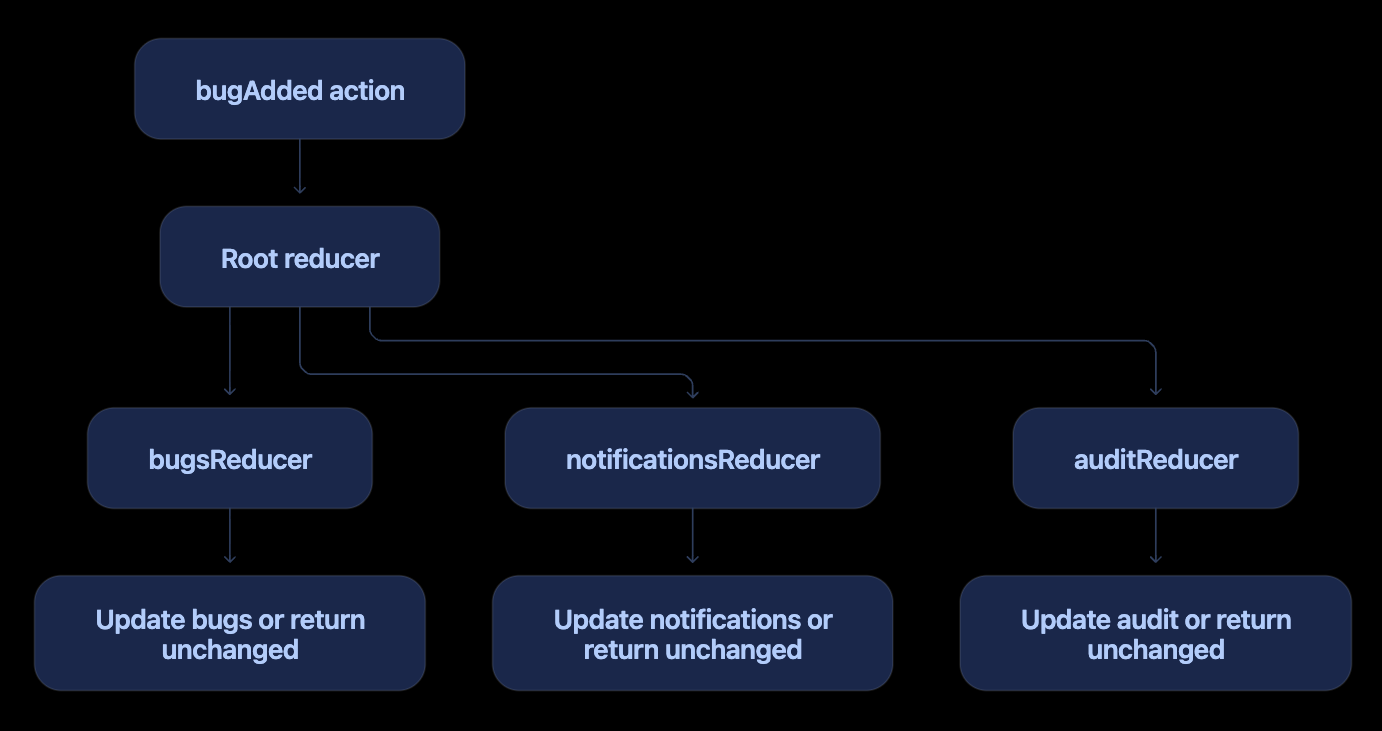
Every registered slice reducer receives the action. A reducer that does not recognize it returns its existing state unchanged.
One action may also affect multiple slices. For example, bugAdded could update the bug list and create an audit entry. Another slice can respond to an externally defined action using extraReducers:
const auditSlice = createSlice({
  name: "audit",
  initialState: [] as string[],
  reducers: {},

  extraReducers: builder => {
    builder.addCase(
      bugAdded,
      (state, action) => {
        state.push(
          `Added bug ${action.payload.id}`,
        );
      },
    );
  },
});
Therefore, the accurate model is:
One slice reducer handles many action types.
One case reducer usually handles one action type within that slice.
One action may be handled by multiple slice reducers.
Every registered slice reducer sees every dispatched action.
The Architectural Pattern Map
Now that we have built the application and traced a click, we can interpret the architecture precisely. Redux is not a textbook implementation of one GoF pattern. It combines several ideas, and each one explains a different part of the runtime flow.
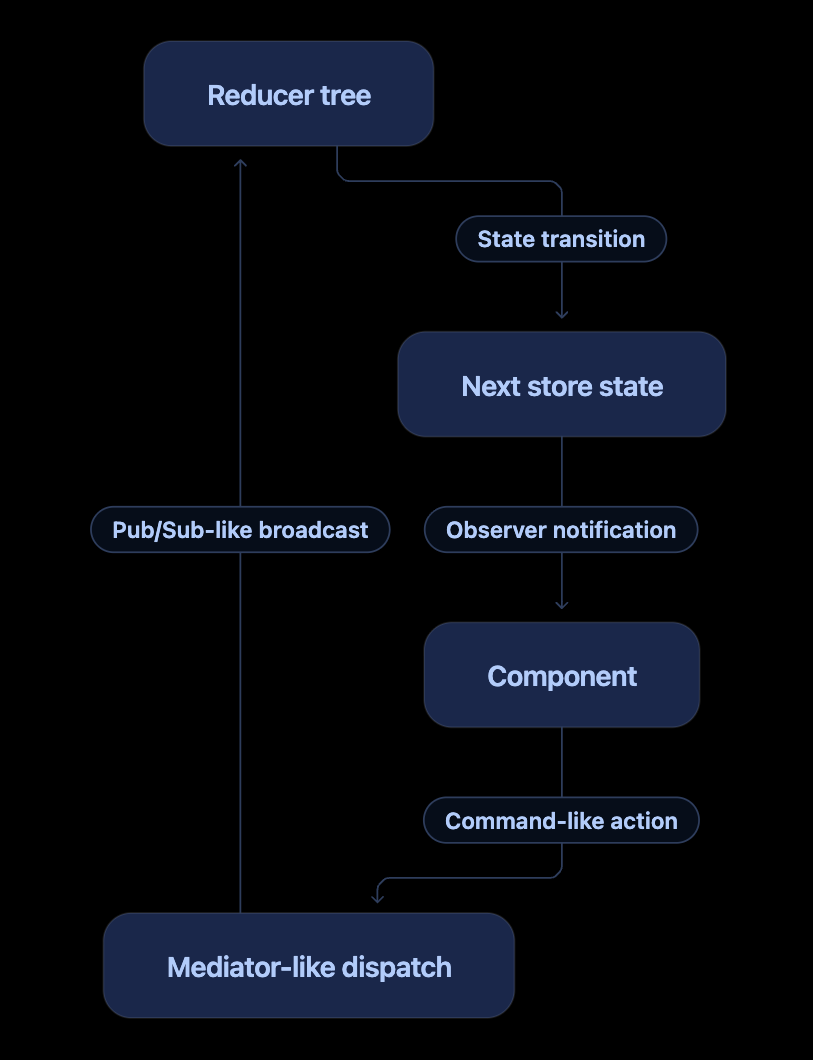
The most useful separation is:
Input side:
Command + mediator-like dispatch + pub/sub-like action broadcast

Core:
Reducer-driven state transition

Output side:
Observer notification + selector-based rendering
Redux and Flux
Flux is an architectural pattern for unidirectional data flow. Traditional Flux commonly uses actions, a dispatcher, multiple stores, and views.
Redux is Flux-inspired, but normally uses:
One store
One state tree
No separate dispatcher object
Reducer functions for state transitions
Selectors for state queries
Traditional Flux:
Action → Dispatcher → Stores → Views

Redux:
Action → store.dispatch → Reducer tree → Store → Views
The store.dispatch() method performs the dispatching role, so Redux does not need a separate dispatcher object.
The Mediator connection
The Mediator pattern reduces direct communication between collaborating objects by routing coordination through a central object.
Without a mediator-like mechanism, components might know and call one another:
BugForm → BugList
BugForm → AuditPanel
BugForm → NotificationPanel
That produces coupling. In Redux, the form knows only how to dispatch an action:
dispatch(bugAdded(description));
It does not know which components display bugs or which additional reducers and middleware may respond.
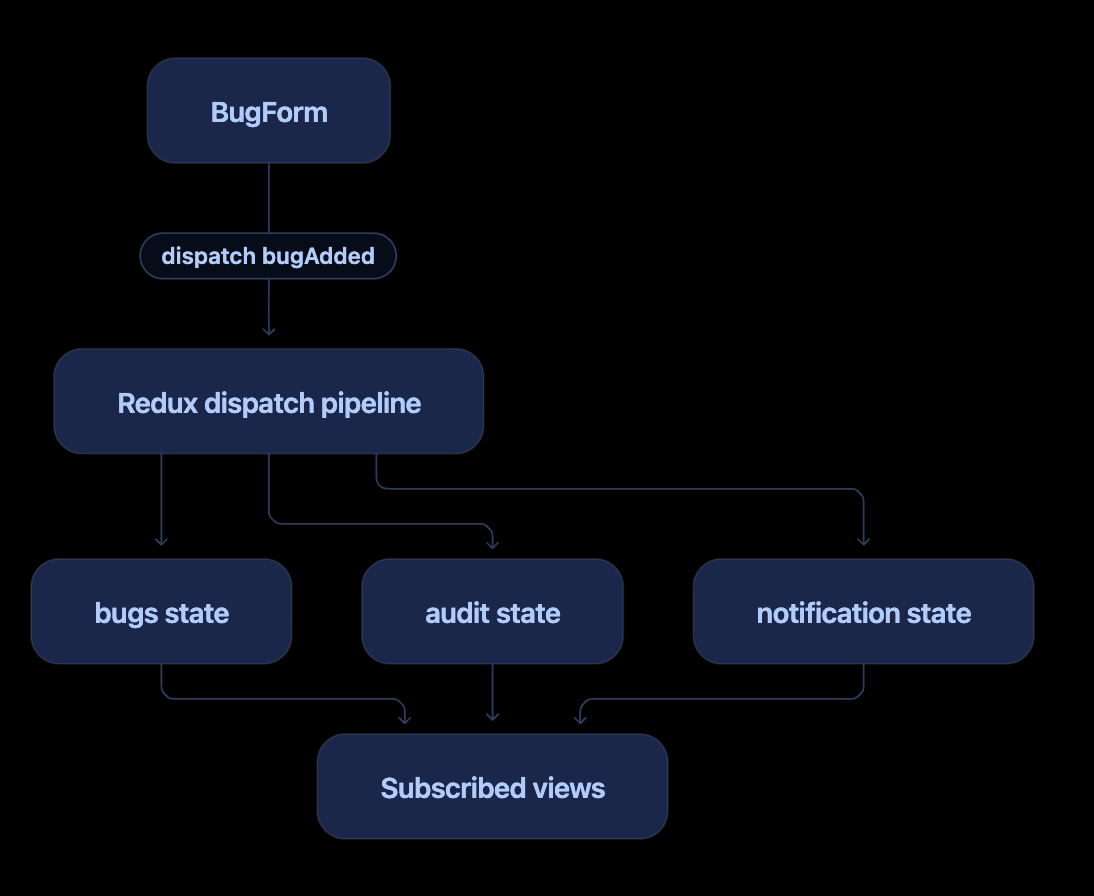
This gives store.dispatch() and the Redux pipeline a mediator-like role: components coordinate through a central mechanism rather than through direct references.
The qualification matters. A classic GoF Mediator often contains imperative coordination logic and directly instructs colleague objects:
class DialogMediator {
  notify(sender: Component, event: string) {
    if (event === "bugAdded") {
      this.bugList.refresh();
      this.auditPanel.record();
    }
  }
}
Redux normally does not command UI objects. It dispatches actions, reducers derive state, and components independently select what they need. Therefore, Redux offers mediator-like decoupling without being a textbook Mediator implementation.
The Publish/Subscribe connection
In Publish/Subscribe, a publisher emits a message without knowing its consumers. An intermediary distributes the message to interested subscribers.
Our publisher is BugForm:
dispatch(bugAdded(description));
The component does not know that the action might be processed by:
bugsReducerA future
auditReducerA future
notificationsReducerLogging or analytics middleware
The dispatched action travels through middleware and the reducer tree. Multiple parts of the application may respond to the same action.
For example, an audit slice can react to an action defined by the bugs slice:
const auditSlice = createSlice({
  name: "audit",
  initialState: [] as AuditEntry[],
  reducers: {},

  extraReducers: builder => {
    builder.addCase(
      bugAdded,
      (state, action) => {
        state.push({
          event: "BUG_ADDED",
          bugId: action.payload.id,
        });
      },
    );
  },
});
One published action can now influence several state slices:
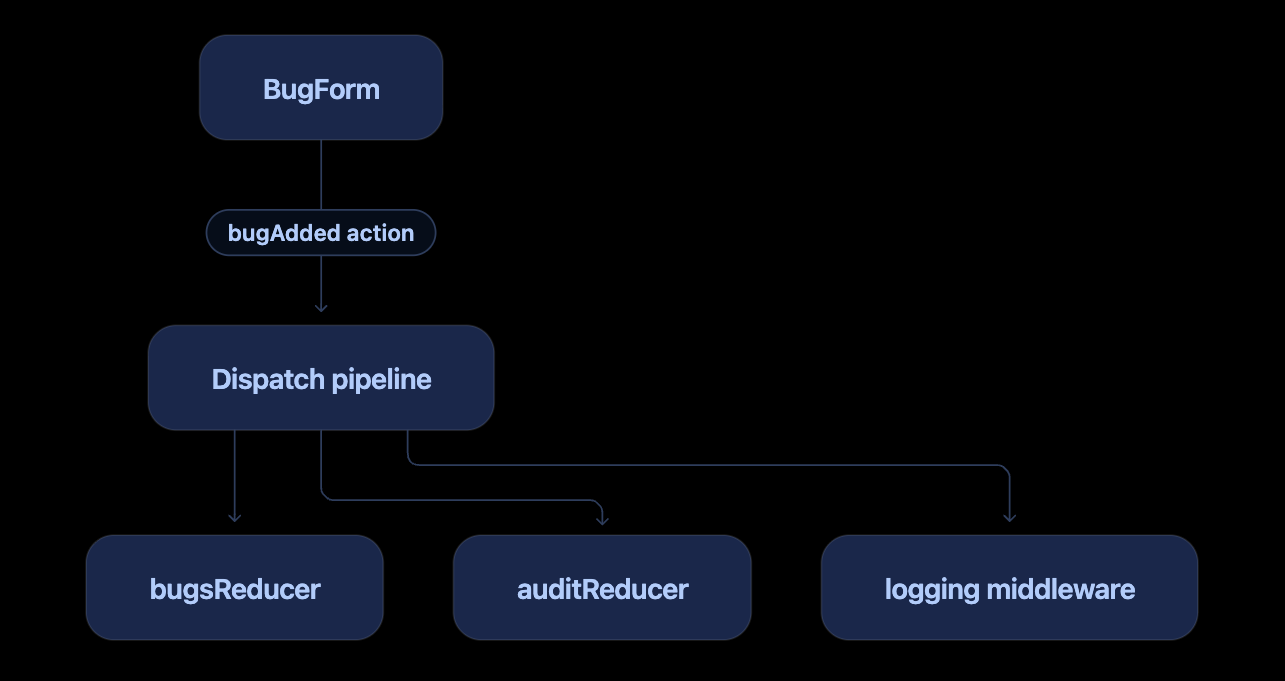
This is Publish/Subscribe-like broadcast behavior, but Redux is not a distributed message broker. Redux is normally in-process, synchronous at its reducer core, non-durable by default, and local to one application runtime. It does not provide the topic retention, delivery guarantees, consumer offsets, or cross-process communication associated with Kafka or RabbitMQ.
There is also an important distinction between the two sides of Redux:
Actions have pub/sub-like broadcast semantics, while store updates use Observer-style notification semantics.
The Observer aspect
Redux directly supports subscription:
const unsubscribe = store.subscribe(() => {
  console.log(store.getState());
});

unsubscribe();
React Redux builds a smarter React integration on top of store subscriptions:
const bugs = useAppSelector(selectAllBugs);
| Observer concept | Redux/React Redux equivalent |
|---|---|
| Subject | Redux store |
| Observer | React Redux subscription/component |
| Subscribe | useSelector() infrastructure |
| Notify | Store notification after dispatch |
| Selected observation | Selector result |
| View update | Component rerender |
Observer explains how consumers learn that state may have changed.
useAppSelector(selectAllBugs) does not subscribe to the bugAdded action. It subscribes the component to store updates and tracks the value returned by selectAllBugs. After any action is processed, React Redux may rerun the selector; the component rerenders only when its selected result changes.
Observer versus Publish/Subscribe
The terms are related, but they should not be treated as synonyms:
| Observer | Publish/Subscribe |
|---|---|
| An observer subscribes to a subject | A subscriber receives messages through an intermediary |
| The subject maintains subscriptions | Publishers do not know the consumers |
| Notification often means “state changed” | A message usually describes a particular event |
| Store-to-React notification resembles this | Action-to-consumers broadcast resembles this |
In our application:
BugForm publishes: bugs/bugAdded
→ Redux processes the action
→ Store state changes
→ Store notifies observers
→ React Redux reruns selectors
→ BugList rerenders if its selection changed
The State-pattern connection
Redux manages explicit states and transitions:
Open bug --bugResolved--> Resolved bug
Bug exists --bugRemoved--> Bug absent
However, Redux is not normally a textbook GoF State pattern. The GoF pattern often encapsulates behavior in polymorphic state objects. Redux represents state as plain data and places transition logic in reducer functions.
It is more precise to say:
Redux uses Observer-style notification around a reducer-driven state-transition system.
The Command/message connection
An action resembles a command or event message:
{
  type: "bugs/bugResolved",
  payload: "bug-101"
}
The component describes what happened. The reducer decides how state changes.
Middleware as a pipeline
Middleware can intercept dispatched actions before they reach reducers. It is useful for logging, asynchronous workflows, analytics, and other cross-cutting behavior.
Conceptually:
dispatch
  → middleware A
  → middleware B
  → reducer tree
  → next state
Our small application needs no custom middleware, but configureStore() creates the middleware pipeline for us.
Provider and dependency injection
This arrangement is DI-like:
<Provider store={store}>
  <App />
</Provider>
The store is the dependency. Provider supplies it through React Context. useAppDispatch() and useAppSelector() consume capabilities from it.
This is better described as context-based dependency provision than traditional constructor injection, but the essential inversion is present: components use a dependency created elsewhere instead of constructing it themselves.
The complete architectural map
| Redux element | Pattern or architectural concept |
|---|---|
| One-way application flow | Flux |
| Action object | Command or event message |
store.dispatch() |
Dispatcher and mediator-like coordination |
| Action reaching middleware and reducer tree | Publish/Subscribe-like broadcast |
| Middleware pipeline | Chain of Responsibility |
| Reducer | Deterministic state-transition function |
| Bug status changes | State-machine semantics |
| Store subscriptions | Observer |
| Selector | Query/projection |
Provider |
Context-based dependency provision |
| Immer updates | Immutable/functional state management |
No single row defines Redux completely. Together they explain why Redux provides both decoupling and predictability.
Redux Compared with C# and MVVM
For developers coming from .NET, the following mapping is useful but approximate:
| React/Redux | C# or MVVM analogy |
|---|---|
| Store | Application state container |
| Slice | Feature-oriented state service |
| Action | Command/event message |
| Payload | Command parameters |
| Reducer | Deterministic state-transition handler |
| Selector | Read-only query/projection |
useSelector() |
Observable state subscription/binding |
| Store notification | INotifyPropertyChanged-like notification |
Provider |
Composition root/context-provided dependency |
An Rx.NET-style approximation of a selector subscription might look like:
stateObservable
    .Select(state => state.Bugs)
    .DistinctUntilChanged()
    .Subscribe(bugs => Render(bugs));
The React Redux equivalent is:
const bugs = useAppSelector(selectAllBugs);
Redux itself is not an Rx stream, but the comparison helps explain selection, change detection, and subscription.
Local State or Redux State?
Not every value belongs in Redux.
Our application makes the distinction visible:
// Temporary value needed only by BugForm
const [description, setDescription] = useState("");
// Shared application data
dispatch(bugAdded(description));
Use the smallest appropriate owner:
| Requirement | Suitable choice |
|---|---|
| One component needs a simple value | useState |
| One component has complex local transitions | useReducer |
| A small value is needed through a subtree | React Context |
| Multiple areas share structured client state | Redux Toolkit |
| Backend data needs fetching and caching | RTK Query |
Examples normally kept local include input text, hover state, and a modal used by one component. Examples that may belong in Redux include the authenticated user, cart, shared filters, multi-page workflows, and application-wide preferences.
Common Mistakes
1. Mutating selected state in a component
Incorrect:
const bugs = useAppSelector(selectAllBugs);
bugs.push(newBug);
Correct:
dispatch(bugAdded(description));
2. Calling a selector before passing it to the hook
Incorrect:
useAppSelector(selectAllBugs());
Correct:
useAppSelector(selectAllBugs);
We pass the selector function. React Redux calls it with store.getState().
3. Calling hooks conditionally
Incorrect:
if (enabled) {
  const bugs = useAppSelector(selectAllBugs);
}
Hooks must be called at the component’s top level and in the same order on every render.
4. Storing derivable values
Avoid storing openBugCount when it can be calculated from items.
5. Importing the store directly into every component
Technically possible:
import { store } from "../../app/store";
store.dispatch(bugAdded(description));
Prefer the hook:
const dispatch = useAppDispatch();
dispatch(bugAdded(description));
6. Assuming the store persists automatically
Redux is an in-memory state container. Refreshing this application clears the bugs. Persistence requires an intentional addition such as local storage or a backend API.
7. Putting non-serializable objects in state
Prefer plain data. Avoid storing DOM elements, promises, functions, class instances, and similar values in Redux state.
How the Three Actions Change State
| Action | Payload | Transition |
|---|---|---|
bugAdded |
Description string supplied to the prepared action creator | Adds a new unresolved bug |
bugResolved |
Bug ID | Changes the matching bug to resolved |
bugRemoved |
Bug ID | Removes the matching bug |
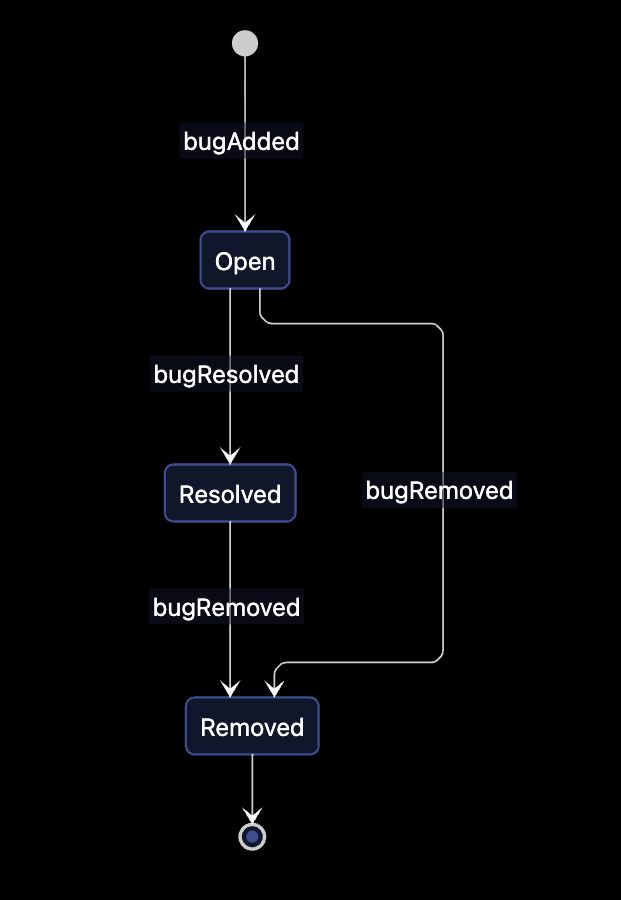
This visual is a domain-level state model. Internally, bugRemoved deletes the item from the array rather than storing an explicit Removed status.
Testing the Mental Model Manually
Run the application and follow these steps:
Open Redux DevTools if available.
Enter
Checkout button does nothing.Click Report bug.
Find the
bugs/bugAddedaction.Inspect its generated
id, description, andresolved: falsepayload.Click Resolve.
Find the
bugs/bugResolvedaction and its ID payload.Confirm that the selected bug now has
resolved: true.Click Remove.
Find the
bugs/bugRemovedaction and confirm the item disappears.
Each visible UI change should be traceable to an action and a deterministic state transition.
How This Application Can Grow
Once the basic flow is comfortable, useful next steps are:
Add severity and category fields.
Add filters for open and resolved bugs.
Add an action to reopen a bug.
Add memoized selectors.
Add unit tests for reducers and selectors.
Add an audit slice that responds to bug actions.
Persist bugs to local storage.
Replace local persistence with an API.
Use RTK Query for server-side bug data.
Add async loading, success, and failure states.
The architecture remains the same even as the application grows:
Component dispatches an action
→ reducer calculates state
→ store publishes an update
→ selectors project state
→ components rerender
Final Takeaway
The Redux framework becomes much less mysterious when each responsibility is kept separate:
Actions describe events.
Dispatch sends actions to the store.
Reducers calculate the next state.
The store owns the state.
Selectors read or derive values.
React Redux subscribes components to selections.
Provider supplies the store to the component tree.
Hooks give components access to these capabilities.
Our complete pattern can be reduced to three central lines:
// Describe and dispatch an event
dispatch(bugAdded(description));
// Define the state transition
state.items.push(action.payload);
// Read and subscribe to selected state
const bugs = useAppSelector(selectAllBugs);
Redux is not merely Observer, Mediator, Publish/Subscribe, State, Command, Flux, or dependency injection. It combines ideas from all of them into a predictable unidirectional state-management architecture.
The most accurate concise description is:
Redux is a Flux-inspired state container. It uses command-like actions, mediator-like dispatch, pub/sub-like action distribution, reducer-driven state transitions, and Observer-style subject/store subscriptions to update consumers predictably.
Once you can trace bugAdded, bugResolved, and bugRemoved from button click to rerender, you understand the foundation of Redux.


